Its wierd.. I tried to create a dbLink from the regurlar whizard from the dbLinks tab in toad.. but it didnt work.. so tried to find and alternative from the SQL Editor and surprisingly it worked.. yayyy..!!!!
create database link SAMPLE_DEV
connect to fdrdbo2
identified by fdrdbo2
using '(DESCRIPTION =(ADDRESS_LIST =(ADDRESS = (PROTOCOL = TCP)(HOST = ada8asff2)(PORT = 3104)))(CONNECT_DATA =(SERVICE_NAME = SONU)))'
You can get this description from your TNSnames.ora file n copy it over here.
this is cool..!!! I can test my sp with real time data connected to the right db. =)
Friday, April 27, 2007

Some Classic SQL's:
SQL to get Second Max form a column:
select * from EMPLOYEE where SALARY = (
select
max(SALARY)
from
EMPLOYEE
where
SALARY < (select max(SALARY) from EMPLOYEE)
--In the condition we are trying to select max from a list which would contain values less than max(salary) and it works =)
-------------------------------------------------------------------------------------
FINDING DUPLICATE ROWS IN A TABLE
-------------------------------------------------------------------------------------
select FAC_OID, count(*) from v_XYX_TABLE group by FAC_OID HAVING count(*) > 1;
will retrieve all values of fac_oid from the table where the fac_oid is repeating. :)
-------------------------------------------------------------------------------------
DELETE AND RENAME A COLUMN FROM ORACLE TABLE
-------------------------------------------------------------------------------------
alter table srgt_path_prelim_lgd drop column PRELIM_LGD_PCT
alter table srgt_path_prelim_lgd rename COLUMN PRELIM_LGD_PCT TO PRELIM_LGD_PCT1
-Sunny
select * from EMPLOYEE where SALARY = (
select
max(SALARY)
from
EMPLOYEE
where
SALARY < (select max(SALARY) from EMPLOYEE)
--In the condition we are trying to select max from a list which would contain values less than max(salary) and it works =)
-------------------------------------------------------------------------------------
FINDING DUPLICATE ROWS IN A TABLE
-------------------------------------------------------------------------------------
select FAC_OID, count(*) from v_XYX_TABLE group by FAC_OID HAVING count(*) > 1;
will retrieve all values of fac_oid from the table where the fac_oid is repeating. :)
-------------------------------------------------------------------------------------
DELETE AND RENAME A COLUMN FROM ORACLE TABLE
-------------------------------------------------------------------------------------
alter table srgt_path_prelim_lgd drop column PRELIM_LGD_PCT
alter table srgt_path_prelim_lgd rename COLUMN PRELIM_LGD_PCT TO PRELIM_LGD_PCT1
-Sunny
Wednesday, April 25, 2007
Executing Dynamic SQL with Ref Cursors
Here is the SP to execute Dynamic SQL built at Runtime:
CREATE OR REPLACE procedure SP_TEST_REF_CURSOR(i_n_proposalId number)as
TYPE FacilityDetails IS REF CURSOR;
facilities_data FacilityDetails;
l_s_facQuery varchar2(10000);
lengthOfString integer;
l_s_status_code varchar2(20);
l_n_edit_code number;
l_n_counter number:=0;
begin
dbms_output.put_line('hello world');
l_s_facQuery:='SELECT FACILITY_STATUS_CODE,FACILITY_ID
FROM
fdrdbo.v_credit_facility@RODR_DEV.NY.SONU.COM
WHERE
(facility_id=198000589 and
facility_version_no =2 and
facility_edit_no=0 and
facility_edit_session_no=0) or (facility_id=299074678 and
facility_version_no =1 and
facility_edit_no=0 and
facility_edit_session_no=0) ';
lengthOfString:=length(l_s_facQuery);
--dbms_output.put_line(lengthOfString);
--put_line(l_s_facQuery,lengthOfString);
--l_s_facQuery:='select proposal_element_id from srgt_proposal_element where proposal_id=489';
OPEN facilities_data FOR l_s_facQuery;
LOOP
FETCH facilities_data into l_s_status_code,l_n_edit_code;
EXIT WHEN facilities_data%NOTFOUND;
l_n_counter:=l_n_counter+1;
dbms_output.put_line('FacilityStatus Code is : ' || l_s_status_code || 'facilityId is :' || l_n_edit_code);
--DBMS_OUTPUT.PUT_LINE('hello world');
--DBMS_OUTPUT.PUT_LINE(l_s_status_code || ' ' || l_n_edit_code);
END LOOP;
CLOSE facilities_data;
DBMS_OUTPUT.PUT_LINE('hello world' || l_n_counter);
end;
/
CREATE OR REPLACE procedure SP_TEST_REF_CURSOR(i_n_proposalId number)as
TYPE FacilityDetails IS REF CURSOR;
facilities_data FacilityDetails;
l_s_facQuery varchar2(10000);
lengthOfString integer;
l_s_status_code varchar2(20);
l_n_edit_code number;
l_n_counter number:=0;
begin
dbms_output.put_line('hello world');
l_s_facQuery:='SELECT FACILITY_STATUS_CODE,FACILITY_ID
FROM
fdrdbo.v_credit_facility@RODR_DEV.NY.SONU.COM
WHERE
(facility_id=198000589 and
facility_version_no =2 and
facility_edit_no=0 and
facility_edit_session_no=0) or (facility_id=299074678 and
facility_version_no =1 and
facility_edit_no=0 and
facility_edit_session_no=0) ';
lengthOfString:=length(l_s_facQuery);
--dbms_output.put_line(lengthOfString);
--put_line(l_s_facQuery,lengthOfString);
--l_s_facQuery:='select proposal_element_id from srgt_proposal_element where proposal_id=489';
OPEN facilities_data FOR l_s_facQuery;
LOOP
FETCH facilities_data into l_s_status_code,l_n_edit_code;
EXIT WHEN facilities_data%NOTFOUND;
l_n_counter:=l_n_counter+1;
dbms_output.put_line('FacilityStatus Code is : ' || l_s_status_code || 'facilityId is :' || l_n_edit_code);
--DBMS_OUTPUT.PUT_LINE('hello world');
--DBMS_OUTPUT.PUT_LINE(l_s_status_code || ' ' || l_n_edit_code);
END LOOP;
CLOSE facilities_data;
DBMS_OUTPUT.PUT_LINE('hello world' || l_n_counter);
end;
/
Monday, April 23, 2007
dbArtisan tips and tricks
Importing data from an external file, csv,or tab separated etc.
Create a table from an existing table
in the tables rt click on the table and do Create Like

Importing data from a file to table:
Rt click on the table
do Import data from

and walk thru the whizard here is the pics


Create a table from an existing table
in the tables rt click on the table and do Create Like

Importing data from a file to table:
Rt click on the table
do Import data from

and walk thru the whizard here is the pics


Sybase Client and dbArtisan
Here is the steps to import Sybase Open client
1) Import open client
2) Put your ini file into the following directory. ( C:\Program Files\Sybase Open Client 12\ini )
Sample ini file:
[CR_HUB_DEV]
master=TCP,10.19.9.90,3325
query=TCP,10.19.9.90,3325
[CR_HUB_UAT]
master=TCP,10.19.9.92,3325
query=TCP,10.19.9.92,3325
[CR_HUB_PDS]
master=TCP,10.19.9.91,3325
query=TCP,10.19.9.91,3325
==================DO NOT ADD BELOW THIS LINE=======================
Testing connection from command prompt:
GOTO the following directory:
1) C:\>cd %sybase%\%sybase_ocs%\bin
2)C:\Program Files\Sybase Open Client 12\OCS-12_0\bin>isql -S CR_HUB_DEV -U rogc
-P j2002
issql <-- Command Name
-S <-- Server Name. In this case CR_HUB_DEV from ini file
-U <-- User Id to connect to server in -S
-P <-- Password to connect to the server in -S
If its connected you shud see the following at the command prompt
1>
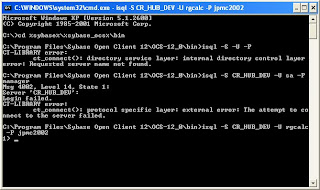
Once this test is done,
Open your dbArtisan
Will ask you a question if you want dbArtisan to automatically configure the Data Sources for you.
Click Yes
it will configure it for you and you will see the following screen
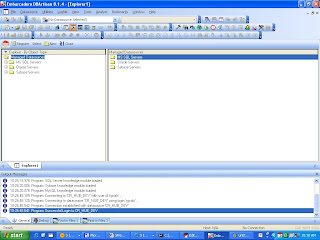
And then click on SQL server you shud see all your servers configured in ini file.
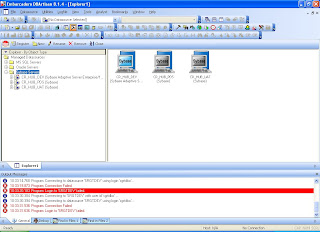
1) Import open client
2) Put your ini file into the following directory. ( C:\Program Files\Sybase Open Client 12\ini )
Sample ini file:
[CR_HUB_DEV]
master=TCP,10.19.9.90,3325
query=TCP,10.19.9.90,3325
[CR_HUB_UAT]
master=TCP,10.19.9.92,3325
query=TCP,10.19.9.92,3325
[CR_HUB_PDS]
master=TCP,10.19.9.91,3325
query=TCP,10.19.9.91,3325
==================DO NOT ADD BELOW THIS LINE=======================
Testing connection from command prompt:
GOTO the following directory:
1) C:\>cd %sybase%\%sybase_ocs%\bin
2)C:\Program Files\Sybase Open Client 12\OCS-12_0\bin>isql -S CR_HUB_DEV -U rogc
-P j2002
issql <-- Command Name
-S <-- Server Name. In this case CR_HUB_DEV from ini file
-U <-- User Id to connect to server in -S
-P <-- Password to connect to the server in -S
If its connected you shud see the following at the command prompt
1>

Once this test is done,
Open your dbArtisan
Will ask you a question if you want dbArtisan to automatically configure the Data Sources for you.
Click Yes
it will configure it for you and you will see the following screen

And then click on SQL server you shud see all your servers configured in ini file.

Friday, April 20, 2007
TNS Ping & SQLPLUS
tnsping is a utility to test your various oracle connections in tnsnames.ora.
it comes with your oracle.
Run the following tests once u install Oracle:
1)Start --> Run --> cmd
2) at the command prompt type in
tnsping
ex: if your tns entry is :
SRGTDEV =
(DESCRIPTION =
(ADDRESS_LIST =
(ADDRESS = (PROTOCOL = TCP)(HOST = cmc8asff2.ny.jpmorgan.com)(PORT = 10005))
)
(CONNECT_DATA =
(SERVICE_NAME = APPRDEV)
)
)
type in :
tnsping SRGTDEV
YOU SHUD SEE THE FOLLOWING SCREEN
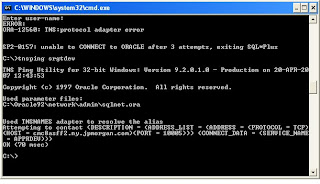
ALSO YOU CAN TYPE IN sqlplus at the command prompt to make sure ur oracle is properly installed. In that case you will see the following:
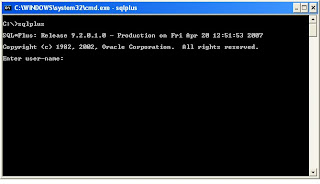
it comes with your oracle.
Run the following tests once u install Oracle:
1)Start --> Run --> cmd
2) at the command prompt type in
tnsping
ex: if your tns entry is :
SRGTDEV =
(DESCRIPTION =
(ADDRESS_LIST =
(ADDRESS = (PROTOCOL = TCP)(HOST = cmc8asff2.ny.jpmorgan.com)(PORT = 10005))
)
(CONNECT_DATA =
(SERVICE_NAME = APPRDEV)
)
)
type in :
tnsping SRGTDEV
YOU SHUD SEE THE FOLLOWING SCREEN

ALSO YOU CAN TYPE IN sqlplus at the command prompt to make sure ur oracle is properly installed. In that case you will see the following:

Saturday, April 14, 2007
JDK and JRE Big lesson learnt
JDK: Java Development tool kit also includes JRE (Java Runtime Environment)
JRE: Java Runtime Environment need not be installed separately. I comes along with JDK. Just make sure if its installed properly
Also biggest mistake made today:
JDK and JRE are of separate versions.And code compiled with a different version of JDK cannot be run on separate version of JRE.
So Ant is showing the following error
class file has wrong version 49.0, should be 48.0
To read more abt this goto: http://forum.java.sun.com/thread.jspa?threadID=517933&tstart=0
Resolution: What I did is uninstall both JDK and JRE and reinstall the same verison from http://java.sun.com/javase/downloads/index_jdk5.jsp
Everything went well and my Build is successful.
JRE: Java Runtime Environment need not be installed separately. I comes along with JDK. Just make sure if its installed properly
Also biggest mistake made today:
JDK and JRE are of separate versions.And code compiled with a different version of JDK cannot be run on separate version of JRE.
So Ant is showing the following error
class file has wrong version 49.0, should be 48.0
To read more abt this goto: http://forum.java.sun.com/thread.jspa?threadID=517933&tstart=0
Resolution: What I did is uninstall both JDK and JRE and reinstall the same verison from http://java.sun.com/javase/downloads/index_jdk5.jsp
Everything went well and my Build is successful.
Subscribe to:
Posts (Atom)
